Dunkin’
Dunkin' Brands, Inc.Food & Drink
4.888.83K Reviews
- Version
- 2026.20.8
- Installs
- 10.00M
- Age Rating
- Everyone
Screenshots
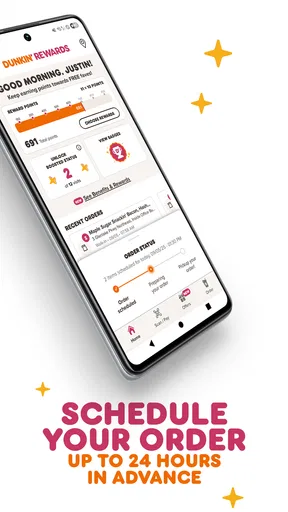
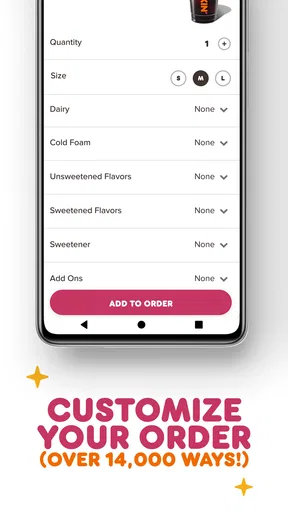
Our Review of Dunkin’
 Analysis by Appyee
If you’re opening the app for the first time, I’d treat it as a practical way to plan a Dunkin’ stop rather than a replacement for every coffee-ordering option. The clearest payoff comes when you already know roughly what you want and have a participating location in mind: you can browse, place an order ahead, and keep your usual choices close at hand. If you prefer deciding at the counter or regularly choose cafés based on what is nearby, the app may be less useful on a given day.
What to expect from a Dunkin’ account
Dunkin’ is a free food-and-drink app from Dunkin’ Brands, Inc., built around ordering ahead and earning rewards. It suits people who visit Dunkin’ often enough to value a saved routine, but it can also help a first-time user get familiar with the menu before arriving. Its 4.6 average from around 591,000 ratings and more than 10 million installs suggest that it has become a familiar ordering option for many customers, though that popularity does not guarantee that every nearby store or visit will feel equally smooth.
The useful distinction is that this is a brand-specific tool, not a general café finder or a broad restaurant-delivery service. You are using it to arrange a Dunkin’ purchase, so it makes the most sense when the chain is already part of your route. If you mainly want to compare independent coffee shops, explore many restaurants in one place, or make an unplanned purchase wherever you happen to be, a map or a wider ordering service may fit better.
Getting ready for the first order
After installing it, take a moment to look through the menu and choose a store before you build an order. That sequence is a small but useful habit: it lets you check that the location you have in mind is the one attached to the order, rather than assuming that the app has selected the branch you expected. The app is rated for Everyone, and it was released on April 13, 2016; the current version is 11.20.1.380, with iOS 11 as the minimum operating-system requirement.
When you set up payment, follow the options actually shown in the app and check the selected payment method before submitting. The published experience describes adding a credit or debit card for phone payment, but it is still sensible to confirm the details on your own screen rather than assume that a previously used card is selected. If you do not want to save a card, you can decide whether ordering through the app is worth it for you based on the payment choices presented at checkout.
Your first successful order
For a low-stress first try, choose a familiar drink and a simple food item, select the store you can reach comfortably, and review the order before placing it. That gives you a straightforward way to learn the flow without having to solve several unfamiliar decisions at once. If you like a customized coffee, check each choice carefully; a familiar name on the menu does not automatically mean the drink is configured the way you usually take it.
A realistic use case is a workday morning when you have a few minutes between leaving home and arriving near a store. You can make your selection before the rush, then collect it rather than starting the order from scratch at the counter. I would still leave a little flexibility in the plan: ordering ahead can reduce the ordering step, but it cannot make your walk or drive disappear, and the handoff depends on the selected location handling the order as expected.
Making the most of repeat visits
I find repeat visits work best when I use the app to reduce decisions, not skip them: I start with a familiar order, then check the selected store and each item before submitting. For a companion’s order or a change to my usual drink, I review the basket separately so customizations do not get carried over by habit. That simple routine makes it easier to tell whether the app is genuinely saving me time.
Easy Navigation
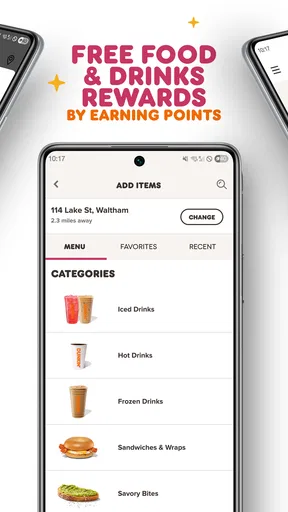
Right off the bat, the app’s interface is clean and user-friendly. You won’t find yourself lost in a maze of options. Everything is laid out in an intuitive way, which makes browsing through the menu a breeze. Whether you’re looking for a classic iced coffee or a new seasonal donut, finding what you want is straightforward.
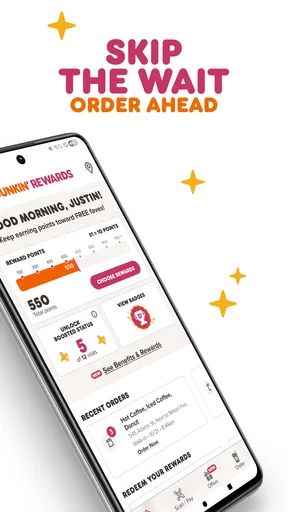
Order Ahead
This feature is a lifesaver, especially during those rushed mornings. You can place your order through the app, choose your preferred pick-up location, and skip the line. It’s as simple as that! Plus, you can customize your coffee to your liking, which is a must for us picky coffee drinkers.
Rewards Galore
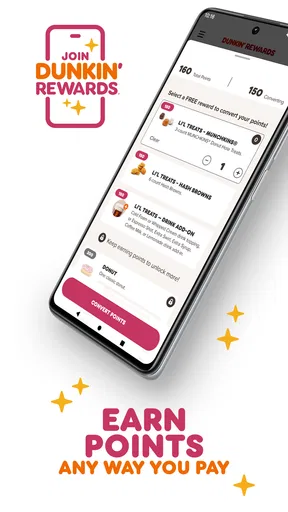
Now, let’s talk about the rewards program. For every purchase you make using the app, you earn points. Once you rack up enough points, you can redeem them for free drinks or snacks. It’s a sweet deal, literally! The app also keeps you in the loop with exclusive offers and promotions, so you’ll never miss out on a good deal.
For rewards, the practical question is not just whether points exist, but whether you remember to use the same app as part of your normal purchase routine. If you visit only occasionally, rewards may be a nice extra rather than a strong reason to change how you order. Before counting on an offer, read the terms visible in the app and check that it applies to the item and store you have selected. That small check prevents the common disappointment of expecting a deal to apply automatically.
Contactless Payment
In today’s world, contactless payment has become more important than ever. The app allows you to add your credit or debit card, so you can pay directly through your phone. It’s quick, secure, and super convenient.
Phone payment is most helpful when you have already checked the order and want to keep the counter interaction brief. It is not a reason to skip reviewing the total or the selected items: customization can change what you meant to order, and a final glance is an easy safeguard. If a payment attempt does not go through, avoid placing the order repeatedly without checking its status first, since you do not want to create duplicate orders by reacting too quickly.
Personalization
I love how the app remembers your previous orders. It’s like it knows you better than your local barista! This feature is perfect for those who have a go-to order and don’t want to fiddle with the menu every single time. Just a few taps and your favorite coffee is ready to go.
Saved habits are convenient, but I would treat an old order as a starting point rather than an automatic choice. If your usual drink has a seasonal component or you are ordering for someone else, open the details and confirm the size and customizations before checkout. That is especially useful when you want to adjust one thing without rebuilding the entire order, and it helps avoid carrying over a preference you no longer want.
Location Finder
Whether you’re traveling or just exploring a new part of town, the app’s location finder is a handy tool. It helps you locate the nearest Dunkin’ store, so you’re never too far from your caffeine fix. No more wandering around looking for that iconic pink and orange logo.
“Nearest” is only a starting point when you are on the move. The closest store may not be the easiest one to reach from your side of the road or the best fit for your schedule, so compare the available locations with your actual route before committing. If you are meeting someone or have a tight break, choosing the branch that is easiest to collect from can matter more than shaving a little distance off the map.
Customization Options
One of the app’s standout features is the ability to customize your order. Want an extra shot of espresso in your latte or a particular type of milk? No problem. The app lets you tailor your drink to your exact preferences, ensuring you get your coffee just the way you like it.
There is a trade-off between precision and speed: customization is valuable if you have specific preferences, but more choices mean more chances to overlook one. I find it useful to build a drink deliberately once, then check whether the previous-order option makes future visits quicker. For a new drink, take the time to review the finished selection instead of rushing through the modifiers simply because the rest of the order is familiar.
When a different option makes more sense
This app is strongest for a regular Dunkin’ customer who wants a repeatable coffee-and-snack routine. It is less compelling if you rarely visit the chain, prefer to pay and choose in person, or want one app that covers many restaurants. A general map can be better for discovering nearby cafés, while ordering at the counter can be simpler when you are unsure what you want or need to ask a question before choosing.
It also helps to separate convenience from certainty. Ordering ahead gives you a way to send your choices before reaching the store, but I would not plan a very tight connection around the assumption that every pickup will be instant. If timing matters, select a branch that fits your route and allow room for the collection itself. For a relaxed stop, browsing in person may be more enjoyable than making decisions on a phone.
Feedback and Support
Lastly, the app also provides an easy way to give feedback or get support if you need it. Whether you want to rave about a great experience or report an issue, the support team is just a few taps away.
If something about an order seems wrong, keep the details clear when you use the support option: identify the visit and explain the problem plainly. That is more useful than sending a vague complaint, especially if the issue concerns a particular item or payment. For everyday questions, checking the order summary before submission is still the better first step; support is there for problems, not a substitute for confirming what is in your basket.
Who will get the most from it
I would recommend trying it if you already stop at Dunkin’ on a regular route, have a dependable favorite, or want to browse before arriving. It can also be handy when you are buying for a companion: build each item carefully and review the full basket so that drink adjustments and snacks do not get mixed up. Someone who enjoys changing cafés day to day, rarely visits Dunkin’, or dislikes account-based ordering may find that the ordinary counter experience is easier.
The app is free, so the decision is mainly about whether its routine fits yours. A sensible first visit is to browse, pick a convenient location, and place one uncomplicated order; after that, you can decide whether saved choices and rewards make repeat use worthwhile. Dunkin’ works best when it removes a step you already find inconvenient, not when it persuades you to make a stop that does not suit your day.
In conclusion, the Dunkin’ app is a must-have for anyone who frequents their stores. It’s packed with features that make ordering, paying, and enjoying your favorite coffee and snacks easier than ever. Plus, the rewards program is a fantastic way to get a little something extra for your loyalty. So, if you haven’t already, give it a try and see how it can enhance your daily coffee routine!
Privacy and Permissions
See what permissions an app requests and how it handles your data.
- Location
- approximate location (network-based), precise location (GPS and network-based)
- Photos/Media/Files
- read the contents of your USB storage, modify or delete the contents of your USB storage
- Storage
- read the contents of your USB storage, modify or delete the contents of your USB storage
- Camera
- take pictures and videos
- Wi-Fi connection information
- view Wi-Fi connections
- Other
- view network connections, full network access, run at startup, control vibration, prevent device from sleeping
Verdict
Strengths of Dunkin’
- User-friendly interface, easy navigation.
- Loyalty rewards for frequent purchases.
- Customizable order options available.
- Quick reordering of favorite items.
- Location finder for nearby stores.
Limitations of Dunkin’
- Occasional app crashes reported by users.
- Limited payment options available.
- Some features require stable internet.
- Push notifications can be overwhelming.
- Limited customization for notifications.
Similar Picks in This Category
View All
Rappi: Food Delivery, Grocery
Rappi, Inc - Delivery3.5

McDonald’s: Cupons e Delivery
Arcos Dorados4.3

Swiggy: Food Instamart Dineout
Swiggy4.7

Blinkit: Groceries & more
Blinkit4.8

foodpanda: food & groceries
Foodpanda GmbH a subsidiary of Delivery Hero SE4.0

Zomato: Food Delivery & Dining
Zomato4.7
Frequently Asked Questions
What features does the Dunkin’ app offer?
The Dunkin’ app provides users with a seamless way to order ahead, earn rewards, and receive exclusive offers. Users can customize their favorite drinks, choose the pickup method, and pay directly through the app. Additionally, the app offers location services to find the nearest Dunkin’ store quickly.
How does the Dunkin’ rewards program work?
The Dunkin’ app includes a rewards program where users earn points for every purchase. For every dollar spent, you earn five points, which can be redeemed for free beverages. The app also offers special promotions and bonuses to help you earn points faster.
Is the Dunkin’ app available on both Android and iOS devices?
Yes, the Dunkin’ app is available for download on both Android and iOS devices. You can find it on the Google Play Store for Android users and the Apple App Store for iOS users. Regular updates ensure compatibility and improve user experience across both platforms.
Can I customize my orders through the Dunkin’ app?
Absolutely! The Dunkin’ app allows you to fully customize your orders. You can select your preferred drink size, add extra shots, and choose your desired flavors. This feature ensures that your order is prepared just the way you like it, enhancing your Dunkin’ experience.
Does the Dunkin’ app offer mobile payment options?
Yes, the Dunkin’ app supports mobile payments, allowing for a quick and contactless transaction. Users can link their credit or debit cards and even use Apple Pay or Google Pay. This feature makes the checkout process fast, efficient, and secure.
